Finding a decent spot to work from in Grand Cayman shouldn’t feel like a treasure hunt. You need reliable wifi, a table that doesn’t wobble, and food that’s better than a sad desk sandwich. Ideally, you’d also like to earn something back while you’re there.
Whether you’re a digital nomad, a local professional between meetings, or someone who just can’t face another day staring at the same four walls, Grand Cayman has a growing number of restaurants and cafés that actually work for working.
Learn more about the best spots for remote work and coffee meetings, what to look for, and how to make your workday dining pay off.
What makes a restaurant good for remote work in Grand Cayman
Not every restaurant is set up for laptop sessions. Some are too loud, some have terrible lighting, and some make you feel guilty for nursing a coffee past the 20-minute mark.
Here’s what separates the good from the unusable:
Reliable wifi
This is non-negotiable. You need a connection that can handle video calls, file uploads, and multiple tabs without dropping out every ten minutes. Ask before you settle in. Most places will tell you the network name and password without hesitation.
Comfortable seating
Bar stools are fine for a quick bite. They’re torture for a three-hour work session. Look for proper chairs, booths, or outdoor seating with back support. If your lower back starts complaining after 30 minutes, it’s not the right spot.
Power outlets
Your laptop battery won’t last all day. Neither will your phone. Check for accessible outlets near tables. Some newer cafés have built-in charging stations or USB ports. Older spots might require a bit of outlet hunting.
Ambient noise level
You want background buzz, not chaos. A bit of chatter and music is fine. Screaming toddlers, clanging kitchens, or a sound system that blast music like a nightclub will ruin your focus and your Zoom calls.
Good lighting
Natural light is ideal. Harsh overhead fluorescents are not. If you’re taking video calls, check how you look on camera before you commit to a table. Backlighting from windows can turn you into a silhouette.
Food and drink that justify the stay
You’re taking up a table, so order something decent. Most places are fine with you working if you’re actually eating or drinking. A single black coffee stretched over four hours may be pushing it. A proper meal, a few coffees, or a steady rotation of snacks keeps everyone happy.
Relaxed vibe
Some restaurants are clearly designed for quick turnover. Others are great for lingering. You want the latter. If the staff start hovering or clearing your plate before you’ve finished chewing, it’s not a work-friendly spot.
Best restaurants and cafés for laptop-friendly dining
Grand Cayman has a solid mix of spots that tick most of these boxes. Here are some reliable options across different areas:
Seven Mile Beach area
This is where you’ll find the highest concentration of cafés and casual dining spots. It’s also where most expats and remote workers end up. Look for beachfront cafés with outdoor seating and possibly ocean views. These tend to have decent wifi, plenty of space, and a relaxed pace. Mornings are quieter. Afternoons can get busy with tourists, so plan accordingly. Coffee shops near hotels and resorts often cater to business travellers, which means they’re set up for laptops and calls. They also tend to have air conditioning, which matters when it’s 32 degrees outside.
George Town
The capital has a more business-focused crowd, especially during weekday lunchtimes. You’ll find cafés near office buildings that are used to people working between meetings. These spots are efficient, well-equipped, and understand the rhythm of professional life. They may be slightly less scenic than beachfront options, but they’re practical and centrally located.
This is one of the best areas for remote work dining. The entire development is designed for foot traffic, outdoor seating, and a mix of work and leisure. Multiple cafés and restaurants here have strong wifi, plenty of seating, and a steady flow of professionals doing exactly what you’re doing. It’s also walkable, so you can move between spots if you need a change of scenery.
East End and North Side
If you’re based outside the main tourist zones, options are thinner but not non-existent. Local cafés and smaller restaurants can be surprisingly good for focused work, especially if you’re looking for quiet and fewer distractions. These spots tend to be more laid-back and less crowded. Just confirm wifi availability before you settle in.
Where to go for coffee meetings versus focused solo work
Not all work sessions are the same. A client call needs different conditions than deep-focus writing time.
For coffee meetings and informal client catch-ups
You want somewhere presentable but not stuffy. Good coffee is a given. A bit of background noise is fine, but you need to be able to hear each other without shouting. Look for cafés with booth seating or corner tables that offer a bit of privacy. Outdoor seating works well if the weather cooperates and traffic noise isn’t overwhelming. Avoid anywhere too trendy or loud. You’re there to talk business, not compete with a playlist.
For focused solo work
You want fewer distractions and more space. Quieter corners, window seats, or outdoor tables away from the main flow work best. Mornings are generally better for focus. Afternoons bring more foot traffic and noise. If you’re doing anything that requires concentration, aim for off-peak hours. Some cafés have dedicated quiet zones or co-working-style setups. These are gold if you can find them.
For video calls
This is the trickiest. You need good wifi, low background noise, decent lighting, and ideally a wall or neutral background behind you. Test your setup before the call starts. Check your audio. Make sure you’re not sitting directly under an air conditioning vent or next to the kitchen. If you’re doing regular video calls, it’s worth scoping out a few reliable spots in advance so you’re not scrambling at the last minute.
Etiquette for working remotely from Cayman restaurants
You’re sharing space with diners, tourists, and staff who are trying to do their jobs. A bit of awareness goes a long way.
Order regularly
If you’re staying for more than an hour, keep ordering. Another coffee, a snack, a proper meal. Don’t camp out on a single espresso for half a day.
Don’t hog tables during peak times
Lunchtime and weekend brunch are busy. If the place is packed and people are waiting, either wrap up or move to a less desirable table to free up prime seating.
Use headphones
Fellow diners probably don’t want to hear your Zoom call, podcast, or overly loud keyboard clicking. Headphones keep your work more contained.
Keep your setup compact
Spread your laptop, notebook, phone, charger, and coffee across the entire table and you’re taking up space that could seat multiple people. Keep it tidy.
Tip well
You’re occupying a table longer than a typical diner. Reflect that in your tip. Staff notice, and it makes a difference.
Ask before you settle in for hours
A quick “Is it okay if I work here for a bit?” to the staff shows respect and gives them a chance to steer you to a better table if needed.
How Bite Club helps you get more value from workday dining
If you’re working from restaurants regularly, you’re spending money on food and drinks anyway. You might as well get something back.
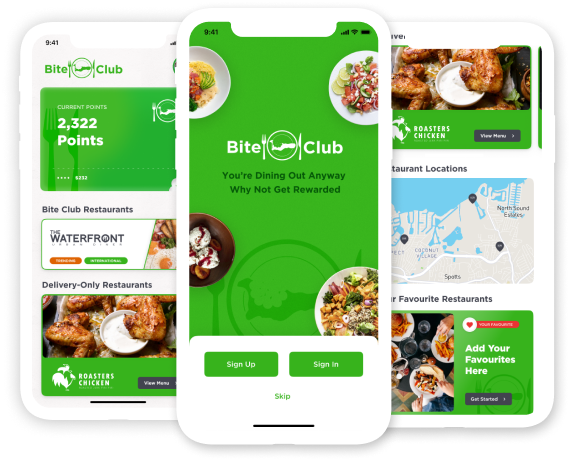
Bite Club is a dining rewards app that partners with restaurants across Grand Cayman. Every time you dine at a partner venue, you earn points. Those points turn into discounts, free dishes, or other perks.
For remote workers, this adds up fast. A few coffees a week, regular lunch spots, client meetings over food, it all counts. Instead of just spending, you’re building credit toward your next meal.
The app also helps you discover new spots. If you’re tired of your usual café, browse partner venues by area, cuisine, or vibe. You might find a better workspace you didn’t know existed. It’s free to join, easy to use, and designed for people who eat out regularly. If you’re already spending on workday dining, there’s no reason not to earn rewards while you do it.
Quick checklist before you settle in
Before you unpack your laptop and commit to a spot, run through this:
- Wifi network name and password confirmed
- Power outlet within reach
- Seating comfortable enough for your planned stay
- Noise level acceptable for your work type
- Lighting good enough for video calls (if needed)
- Menu has options you’ll actually want to eat or drink
- Staff seem relaxed about people working
- Table location works for your privacy needs
If most of these check out, you’re good to go.
Ready to earn rewards while you work? Download Bite Club and start earning points every time you dine at partner restaurants in Grand Cayman. Whether it’s your morning coffee spot or your go-to lunch venue, make your workday dining pay off. Join Bite Club today and explore work-friendly venues across the island.